
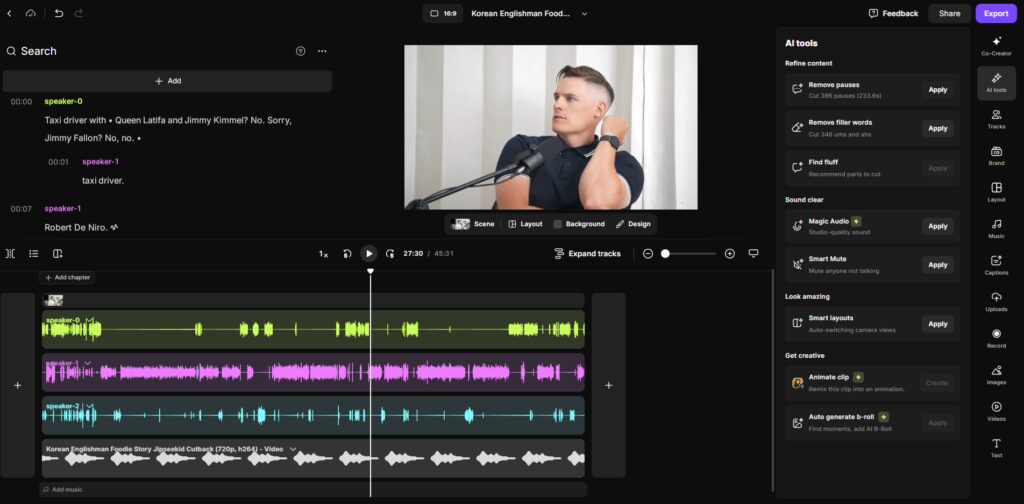
Have you ever sat down to edit a podcast episode, only to realize that a 30-minute interview is going to take you five hours to polish? Between cutting out every “um” and “uh,” balancing the volume levels, and trying to scrub out that persistent hum of your neighbor’s lawnmower, the “creative” part of podcasting can quickly feel like a chore. 😫🧤
But the landscape has shifted. We are no longer tied to manual, waveform-by-waveform editing. Artificial Intelligence has moved from being a futuristic concept to a practical, everyday co-producer. Today, AI can “listen” to your audio, understand your speech, and even help you distribute your show to thousands of listeners with a single click.
Whether you are a solo creator or a professional production team, these tools are designed to give you back your time while making your show sound like it was recorded in a million-dollar studio. Let’s dive into the 5 best AI tools for professional podcast editing and distribution! 🚀🎧
What is AI Podcast Editing and How Does It Work? 🧐
AI podcast editing isn’t just a fancy filter; it’s a suite of technologies like Natural Language Processing (NLP) and Machine Learning that treat your audio as data.
- Text-Based Editing: Some tools transcribe your audio into text, allowing you to edit the sound by simply deleting words in a document. Delete a sentence in the transcript, and the AI cuts the audio perfectly. 📝✂️
- Neural Noise Reduction: Instead of just “muffling” background noise, AI identifies what is a human voice and what is “noise” (like a fan or traffic), rebuilding the voice frequencies for crystal-clear clarity.
- Automated Distribution: AI analyzes your finished episode to generate show notes, social media captions, and even “audiograms”—short video clips that are optimized for platforms like Instagram and TikTok.
The Top 5 AI Tools for Your Podcast Workflow 🏆
If you want to move from “hobbyist” to “professional,” these are the five tools you need in your arsenal.
1. Descript: The Industry Standard for Text-Based Editing ✍️🎥
Descript changed the game by making audio editing as easy as editing a Word document. If you can use a keyboard, you can edit a podcast with Descript.
- The Killer Feature: Overdub. If you realize you misspoke or forgot to mention a sponsor, you can simply type the new words, and Descript’s AI will generate them in your own voice. 🤯
- Best for: Creators who want to edit audio and video simultaneously while generating instant transcripts.
- Check it out: Descript.com
2. Riverside.fm: The Remote Studio with AI Magic 🌐✨
Riverside is the go-to for remote interviews. It records high-quality local audio and video for every guest, so a bad internet connection won’t ruin your show.
- The Killer Feature: Magic Clips. With one click, Riverside’s AI identifies the most “viral” or engaging moments of your interview and turns them into vertical social media clips with captions. 📱🔥
- Best for: Interview-style podcasts that need high-end video and easy social media promotion.
- Affiliate Insight: Many pros use Riverside because it saves hours of “syncing” audio tracks later. You can get started for free on Riverside.fm.
3. Adobe Podcast: Studio Quality for the “Home Office” 🏠🎙️
Adobe has taken its decades of audio expertise and distilled it into an AI tool that is surprisingly simple yet incredibly powerful.
- The Killer Feature: Enhance Speech. You can upload a recording made on a cheap phone in a noisy room, and Adobe’s AI will make it sound like it was recorded on a professional Shure SM7B in a soundproof booth. 💎
- Best for: Solo podcasters who don’t have a professional studio setup but want that “warm” radio sound.
4. Castmagic: The Ultimate Post-Production Assistant 🤖📝
Once the recording is done, the work of “distribution” begins. Castmagic is an AI tool that takes your audio file and turns it into a full marketing suite.
- The Killer Feature: Content Repurposing. It automatically writes your show notes, timestamps, LinkedIn posts, and even newsletter drafts based on the actual content of your conversation.
- Best for: Business podcasters who need to squeeze every bit of value out of every episode.
5. Auphonic: The “Final Polish” Bot 🛁🧼
Think of Auphonic as the “automated sound engineer.” It’s a post-production web service that handles the technical stuff you probably hate.
- The Killer Feature: Loudness Normalization. It ensures your podcast isn’t too quiet on one platform and too loud on another, hitting the global standards (LUFS) perfectly every time.
- Best for: Podcasters who have their editing down but need help with the technical “mastering” and leveling.
The Benefits and Challenges of AI Podcasting 🌈🚧
The Upside:
- Speed: Tasks that took 6 hours now take 30 minutes. ⏱️
- Accessibility: You don’t need to be a sound engineer to have a professional-sounding show.
- Multi-Platform Reach: AI makes it effortless to turn one audio episode into five social media videos and a blog post.
The Hurdles:
- The “Uncanny Valley”: While voice cloning (like Overdub) is amazing, it can sometimes sound a bit robotic if overused. 🤖
- Context Mistakes: AI transcription is roughly 95-98% accurate, but it might still struggle with heavy accents or niche technical jargon. Always do a quick manual proofread!
- Loss of “Texture”: Sometimes, “perfectly clean” audio can feel a bit sterile. A little bit of “room sound” can actually make a podcast feel more human and intimate. ❤️💬
Future Trends: Where is Podcast AI Heading? 🔮
We are quickly moving toward “Real-Time Translation.” Imagine recording your podcast in English and having an AI co-host translate it into Spanish or Hindi in real-time, matching your original tone and emotion. 🌍🗣️
We are also seeing the rise of “AI Showrunners”—tools that will analyze your listener data to suggest what topics you should talk about next to maximize your growth. The line between “editing” and “strategy” is blurring.
Conclusion: Work Smarter, Not Harder 🏁🌟
The goal of a great podcast is to connect with your audience and tell a compelling story. Don’t let the “technical wall” of editing stand in the way of that. By leveraging tools like Descript for editing, Riverside for recording, and Castmagic for distribution, you are freeing yourself up to focus on what matters: the conversation.
The most successful podcasters aren’t the ones with the most expensive equipment; they are the ones who are consistent. And in a world of AI, consistency is easier than ever.
Ready to start your show? Pick one tool from this list today and see how much time you can save! 🎙️✨